
Top 10 SEO Mistakes Restaurant Websites Make and How to Fix Them
Your restaurant's website should bring in more customers and reservations.
But small technical mistakes can hide your site from people searching for a place to eat nearby.
Many restaurant websites lose potential diners because of avoidable SEO errors that affect how they appear in local search results.
These problems range from slow loading times to missing location information to menus that search engines cannot read properly.
This guide covers the most common SEO mistakes that keep restaurant websites from ranking well in search engines.
You will learn practical ways to fix each issue so more local customers can find your restaurant online.
10) No review-acquisition strategy and unclaimed review responses
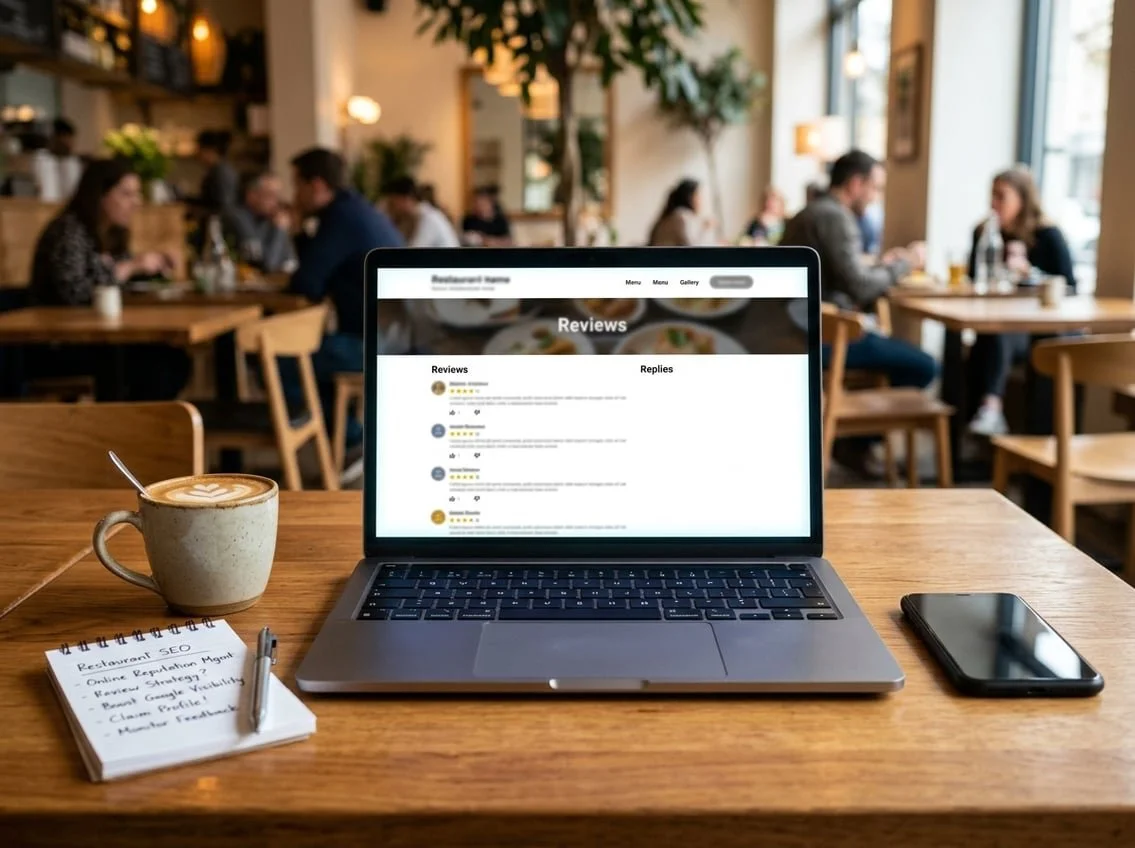
Many restaurant websites overlook the importance of actively gathering customer reviews.
Without a clear plan to ask satisfied diners for feedback, you're missing valuable content that helps your search rankings.
Reviews play a significant role in local SEO.
Google uses them to understand your restaurant's relevance and reputation.
When potential customers search for dining options, businesses with more recent reviews often rank higher in local search results.
You need to make it easy for customers to leave reviews.
Add clear links to your Google Business Profile and other review platforms on your website and receipts.
Train your staff to politely request reviews from happy customers.
Unclaimed or ignored reviews hurt your credibility and rankings.
When you don't respond to feedback, you signal to both search engines and potential customers that you're not engaged with your business.
Google favours businesses that actively manage their online presence.
Respond to all reviews, both positive and negative.
Thank customers for kind words and address concerns professionally.
This shows you value customer feedback and helps build trust with people researching your restaurant online.
9) Thin or duplicate menu and location content across pages
Many restaurant websites copy the same menu descriptions across multiple locations.
This creates duplicate content that Google may ignore or rank lower in search results.
When you run several locations, each page needs unique content.
Writing "We serve fresh pizza made daily" on ten different location pages tells Google nothing new about each spot.
Search engines want to see real differences between your pages.
Thin content happens when your menu pages only list dish names and prices.
These pages lack the detail that helps customers and search engines understand what you offer.
A sparse menu page with no descriptions or photos provides little value.
You can fix this by writing unique descriptions for each location.
Include details about local ingredients, specific chefs, or neighbourhood connections.
Add photos of actual dishes from that location.
For menu items, write full descriptions that explain ingredients, preparation methods, and flavours.
If you have the same dish at multiple locations, change the wording for each page whilst keeping the key information.
8) Broken or poorly configured reservation and ordering links

Your reservation and ordering links need to work every time a customer clicks them.
A broken link means lost revenue because hungry customers will simply visit a competitor's website instead.
Test all your booking and ordering buttons regularly.
Click through each one to verify it loads the correct page.
Check them on both mobile phones and desktop computers, as links sometimes break on one device but not the other.
Configuration errors are equally problematic.
Links that direct customers to the wrong menu, an outdated third-party platform, or a page that doesn't match your current offerings create confusion.
Some restaurants accidentally link to reservation systems they no longer use or ordering platforms with incorrect hours.
Make certain your links open properly.
External ordering platforms should load quickly without multiple redirects.
Internal reservation forms must submit correctly and send confirmation emails.
Update your links whenever you change service providers or modify your booking system.
Add these checks to your monthly website maintenance routine.
Your customers expect a smooth path from browsing your menu to placing an order or booking a table.
7) Missing NAP (name, address, phone) consistency across sites
Your restaurant's name, address, and phone number need to appear exactly the same across every online platform.
This includes your website, Google Business Profile, Facebook, Yelp, and any directory where your business is listed.
When search engines find different versions of your information, they struggle to verify which details are correct.
For example, listing "123 High Street" on one site and "123 High St." on another creates confusion.
These inconsistencies harm your local search rankings.
Search engines use your NAP data to confirm your business is legitimate and trustworthy.
Mixed signals from inconsistent information make it harder for you to appear in local search results.
Your potential customers also suffer from this problem.
They might call an old phone number or arrive at a previous location because outdated information still exists somewhere online.
Check every platform where your restaurant appears.
Make sure your business name, full address, and phone number match perfectly everywhere.
Even small differences like "Ltd" versus "Limited" or missing suite numbers count as inconsistencies.
Consistent NAP data across all platforms strengthens your local SEO and helps customers find you easily.
6) No localised keyword targeting (neighbourhood + cuisine)
Many restaurant websites fail to target the specific search terms people actually use when looking for places to eat.
Diners don't just search for "Italian restaurant." They search for "Italian restaurant in Shoreditch" or "best pizza in Camden."
If your website doesn't include your neighbourhood name combined with your cuisine type, you're missing valuable search traffic.
These hyperlocal keywords help you appear when potential customers search for dining options in your specific area.
Your homepage, menu pages, and location pages should naturally mention your neighbourhood alongside what you serve.
Write content that reflects how real people search, like "Thai food in Brixton" or "seafood restaurant in Brighton."
Don't forget to target nearby neighbourhoods too.
If you're located between two popular areas, mention both on your website.
This expands your reach to diners searching from adjacent postcodes.
Check what your competitors rank for and identify gaps in your own keyword strategy.
Focus on terms that match what you offer and where you're actually located.
5) Poor mobile-responsive design and touch targets
Most restaurant customers search for places to eat on their phones.
If your website doesn't work properly on mobile devices, you're losing potential diners before they even see your menu.
A non-responsive design forces users to pinch and zoom to read text or view images.
This creates a frustrating experience that sends customers straight to your competitors.
Your website must automatically adjust to fit different screen sizes without breaking the layout.
Touch targets present another critical issue.
Buttons and links that work fine with a mouse cursor become impossible to tap accurately on a touchscreen.
Your clickable elements need to be large enough for fingers to press easily.
Navigation menus deserve special attention.
Tiny menu items crammed together cause users to tap the wrong links repeatedly.
Space out your buttons and make them at least 48 pixels tall for comfortable tapping.
Pop-ups that cover the entire mobile screen are particularly problematic.
Visitors can't close them or navigate around them, which drives them away from your site.
Keep pop-ups minimal or avoid them entirely on mobile devices.
Google penalises websites with poor mobile experiences in search rankings.
A mobile-friendly design isn't optional anymore.
4) Lack of page-speed optimisation (slow Core Web Vitals)
Your restaurant website's loading speed directly affects your search rankings.
Google uses Core Web Vitals to measure how fast your pages load, how quickly visitors can interact with them, and whether elements shift around unexpectedly.
Research shows that 53% of users leave a page if it takes more than 3 seconds to load.
When potential diners encounter a slow website, they'll simply move on to a competitor's site.
Common issues include oversized images, unoptimised code, and lack of browser caching.
Restaurant websites often struggle with large food photos that haven't been compressed properly.
You can test your site's performance using Google's PageSpeed Insights tool.
This free resource shows exactly which metrics need improvement and provides specific recommendations.
Fixing these issues improves your rankings whilst reducing bounce rates.
A faster website means more bookings and takeaway orders from people who actually stick around long enough to browse your menu.
3) Menus provided only as PDFs instead of HTML
PDF menus create serious problems for your restaurant's search visibility.
Search engines cannot easily read or index the text inside PDF files.
This means your menu items, descriptions, and prices remain hidden from Google.
When someone searches for "restaurants near me with gluten-free options," your site won't appear in results if those details are trapped in a PDF.
Search engines need properly structured HTML text to understand what you offer.
PDF menus also frustrate mobile users.
Most people browse restaurants on their phones.
PDFs require downloading, pinching, and zooming.
Many visitors will simply leave your site rather than struggle with a clunky file.
HTML menus load quickly and adjust to any screen size.
They let search engines catalogue every dish you serve.
You can easily update prices or add seasonal items without creating a new file.
Your menu represents your most important content.
Making it accessible through proper HTML formatting helps both customers and search engines find exactly what they're looking for.
2) No local schema markup (LocalBusiness/Restaurant) on pages
Schema markup helps search engines understand your restaurant's information better.
When you add LocalBusiness or Restaurant schema to your website, you give Google structured data about your business hours, location, menu, and contact details.
Many restaurant websites skip this step entirely.
This means search engines have to guess what information matters most about your business.
Adding schema markup can improve how your restaurant appears in search results.
You might show up with rich results that display your star ratings, price range, or opening hours directly in Google.
These enhanced listings often get more clicks than basic text results.
The code sits in the background of your web pages.
Customers won't see it, but search engines will read it.
You can add schema markup to your homepage, location pages, and menu pages.
Google's Structured Data Markup Helper makes this process easier.
You don't need to be a developer to implement basic schema markup.
Small mistakes in your schema code can stop it from working, so always test your markup using Google's Rich Results Test tool.
1) Missing or Incomplete Google Business Profile Listings
Your Google Business Profile directly affects how customers find your restaurant online.
When someone searches for restaurants nearby, Google uses your profile to decide if your business appears in the results.
Many restaurants either skip setting up their profile or leave important information blank.
This hurts your visibility in local searches and on Google Maps.
Start by claiming your business profile if you haven't already.
Then fill out every section completely.
Add your restaurant name, address and phone number exactly as they appear on your website.
Choose accurate business categories that describe what you serve.
Include your opening hours for each day of the week.
Upload high-quality photos of your food, interior and exterior.
Write a clear business description that tells people what makes your restaurant worth visiting.
Keep your information current.
Update your hours during holidays or special events.
Respond to customer reviews regularly.
Add posts about your menu specials or upcoming events.
An incomplete profile sends customers to your competitors instead.
Google favours businesses that provide complete, accurate information to searchers.
The Role of User Experience in Online Visibility
Search engines track how visitors interact with your restaurant website.
When people leave quickly or struggle to find information, it signals poor quality to Google.
Google measures specific behaviours on your site.
Bounce rate shows how many visitors leave without clicking anything.
Time on page reveals whether people find your content useful.
Click-through rate demonstrates if your headings and layout guide users effectively.
Key user experience elements that affect rankings:
Mobile-friendly design and touch-friendly buttons
Clear navigation to menus, hours, and contact details
Readable text without zooming required
Working forms for reservations and orders
Your menu placement matters most.
Visitors expect to find it within two clicks.
Hidden menus or PDF files frustrate users and increase bounce rates.
Contact information needs to appear on every page.
Include your phone number, address, and opening hours in your header or footer.
How Page Speed Influences Local Search Results
Page speed affects your position in local search results.
Google prioritises fast-loading websites because users abandon slow sites.
Most diners search for restaurants on mobile devices.
Your pages should load in under three seconds on mobile networks.
Every additional second of load time reduces conversions by up to 20%.
Common speed problems on restaurant websites:
Large, uncompressed food photography
Too many third-party scripts and widgets
Missing browser caching
Unoptimised video content
Compress your images before uploading them.
Food photos should be under 200KB whilst maintaining visual quality.
Use modern formats like WebP when possible.
Remove unnecessary plugins and widgets.
Each extra script adds load time.
Keep only essential tools like reservation systems and online ordering platforms.
Strategies for Sustainable SEO Growth
Long-term SEO success requires building authority through quality backlinks and helping search engines understand your restaurant's information through structured data markup.
Building Reliable Backlink Profiles
Quality backlinks from reputable websites signal to Google that your restaurant is trustworthy and relevant.
Focus on earning links from local news sites, food bloggers, and community organisations rather than buying links or using link farms.
Partner with local food suppliers and ask them to feature your restaurant on their website.
Sponsor community events and charity fundraisers to earn mentions and links from legitimate local organisations.
These connections provide valuable backlinks whilst strengthening your community presence.
Get featured in local dining guides and "best of" lists by reaching out to food writers and bloggers in your area.
Offer unique story angles about your chef, sustainable sourcing practices, or signature dishes that make your restaurant newsworthy.
Create shareable content like recipe videos, cooking tips, or behind-the-scenes kitchen tours that food enthusiasts want to link to naturally.
When other websites reference your content, you gain backlinks without actively requesting them.
Leveraging Structured Data for Enhanced Listings
Structured data markup helps search engines display rich results like star ratings, price range, opening hours, and menu items directly in search results.
Implement schema markup using the Restaurant and LocalBusiness schema types to provide this information.
Add menu schema to help Google show your dishes and prices in search results.
Include important details like dietary information, ingredients, and dish descriptions that appear when potential diners search for specific foods.
Mark up your business hours, including special holiday hours and temporary changes.
This prevents frustrated customers from arriving when you're closed.
Include reservation links and phone numbers in your markup so they appear prominently in search results.
Test your structured data using Google's Rich Results Test tool to ensure it's implemented correctly.
Errors in your markup can prevent enhanced listings from appearing, wasting the effort of adding this code to your website.
Frequently Asked Questions
Restaurant websites often struggle with specific technical and local SEO challenges that prevent customers from finding them online.
Missing structured data, inconsistent business information, and poor mobile performance are among the most damaging issues that limit local visibility and bookings.
Which on-page SEO issues most commonly stop restaurant sites from ranking locally?
Missing localised keywords in page titles and headings prevents search engines from connecting your restaurant to nearby searchers.
You need to include your neighbourhood name and cuisine type in strategic places like your homepage title and H1 tags.
Many restaurant sites lack proper schema markup for menus, hours, and pricing.
This structured data helps Google understand your content and display it in rich results.
Your meta descriptions and title tags often fail to mention specific locations or dishes.
Without these local signals, search engines struggle to rank your pages for relevant searches in your area.
Internal linking between location pages and menu sections is frequently missing.
This makes it harder for search engines to crawl your entire site and understand the relationship between your pages.
How does inconsistent NAP information across directories affect a restaurant's local SEO?
When your name, address, and phone number differ across directories, Google cannot verify which version is correct.
This confusion reduces your trust signals and pushes you down in local search results.
You might list your business as "Joe's Pizza" on one directory and "Joe's Pizzeria" on another.
These inconsistencies make Google think you're two separate businesses.
Different phone numbers or outdated addresses on review sites and directories dilute your local SEO authority.
Google's algorithm relies on consistent citations to confirm your business legitimacy and location.
Even small variations like "Street" versus "St" or including a suite number on some listings but not others creates problems.
You need exact matches across all platforms to maximise your local search visibility.
What technical SEO problems on restaurant websites most often harm crawlability and indexing?
Broken reservation and ordering links create dead ends that frustrate both users and search engine crawlers.
These errors signal poor site quality and prevent important pages from being indexed.
Many restaurant sites block important pages with robots.txt files or noindex tags by mistake.
Your menu pages and location information need to be fully accessible to search engines.
Missing or poorly configured XML sitemaps make it difficult for Google to discover all your pages.
You should submit a current sitemap that includes all your menu pages, location pages, and blog posts.
Redirect chains and 404 errors commonly appear when restaurants update their menus or change their booking systems.
These issues waste your crawl budget and prevent search engines from accessing your fresh content.
Slow server response times cause crawlers to give up before fully indexing your pages.
Your hosting needs to deliver pages quickly to both users and search engine bots.
How do slow loading times and poor mobile usability impact a restaurant's search visibility and bookings?
Page speed directly affects your rankings because Google uses Core Web Vitals as ranking factors.
Sites that load slowly on mobile devices get pushed down in search results.
Most restaurant customers search on their phones whilst deciding where to eat.
If your site takes more than three seconds to load, potential diners will click back to search results and choose a competitor.
Poor mobile usability means buttons are too small, text is unreadable, or menus require pinching and zooming.
These problems increase your bounce rate, which signals to Google that your site provides a bad user experience.
Heavy images from food photography often slow down mobile loading times.
You need to compress and optimise all images whilst maintaining quality that shows off your dishes.
Why can thin or duplicated menu and location content reduce a restaurant website's organic performance?
When you copy the same menu description across multiple location pages, Google sees duplicate content.
Search engines may choose not to rank any version or only show one location in results.
Thin content on menu pages that only lists item names and prices provides no value to searchers.
You need unique descriptions that include ingredients, preparation methods, and dietary information to rank well.
Location pages with just an address and phone number fail to target local keywords.
Each location needs unique content about the neighbourhood, parking information, and local specialities.
Many restaurants use the same boilerplate text across different pages.
This wastes an opportunity to target different search queries and rank for varied local terms.
How does failing to optimise Google Business Profile and local citations limit a restaurant's presence in map results?
An unclaimed or incomplete Google Business Profile keeps you out of the local map pack.
This prime real estate shows only three businesses for local searches, and you cannot appear there without a fully optimised profile.
Missing categories, attributes, and business hours on your profile reduce your relevance for specific searches.
You need to select all applicable categories and fill out every field to maximise visibility.
Restaurants that ignore review responses signal poor customer service to both Google and potential diners.
Your engagement with reviews affects your local ranking and conversion rate.
Inaccurate business information on citation sites contradicts your Google Business Profile.
These conflicts confuse Google's algorithm and lower your trust score for local searches.
Photos and posts on your Google Business Profile improve engagement signals.
Profiles without regular updates and quality images get less visibility in map results compared to active competitors.
